Copy Send 1–10
Ten separate commands copy each send slot’s volume, pan and mute automation. Paste matches an existing bus first, then the send slot. It never creates missing sends; unmatched parameters are reported.
 EA AUDIO
EA NATIVE AUTOMATION · v2.2.15
FOR REAPER / AUDIO POSTI built this panel while moving from Pro Tools to REAPER. It brings the automation controls I use in audio post into one window.
v2.2.15 through ReaPack · Windows x64 + Mac Intel/Apple Silicon.
Mac remains a preview needing live REAPER testing. Linux source only.
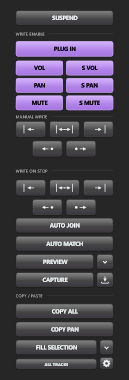
LATEST RELEASE / 2.2.15
Version 2.2.15 is now available through ReaPack for Windows x64 and both Intel and Apple Silicon Macs, with the improvements below.
Ten separate commands copy each send slot’s volume, pan and mute automation. Paste matches an existing bus first, then the send slot. It never creates missing sends; unmatched parameters are reported.
The whole Preview button blinks green while active; the separate dot is gone. Preview follows across all tracks and Master. Turning it off sets them to Read and removes the global override. Ctrl/Cmd-click retains Preview A/B suspension.
Controls keep their chosen size while the Docker divider reveals more rows or columns. Thin top/bottom docks form a row; narrow side docks form a column. Overflow scrolls instead of shrinking the whole toolbar.
Right-click → Show sections lets you show or hide Suspend, Write Enable, Manual Write, Write on Stop and Copy/Paste. Section choices are saved; hiding a section does not change its automation state.
Small text and vector icons render at their final size on the pixel grid. The panel reads REAPER 7’s Inter/Inter Medium fonts when present, with system-font fallbacks. Exact 50–200% presets remain available.
Separate send-copy and section-visibility actions join the existing commands. Assign your own keys in REAPER’s Main Actions list. The panel also preserves your “Automatically add envelopes when tweaking parameters in automation write modes” preference.
These features are included in the v2.2.15 ReaPack update. Automated checks passed; live Mac REAPER testing and the reported track volume/pan write issues remain open.
WHY I MADE IT
Switching from Pro Tools, I wanted a compact automation window that felt familiar in a post session. REAPER’s scripting and extension capabilities made it possible to build one around its own automation system.
THE AUTOMATION WORKFLOW
Keep the controls you reach for together, then put the actions under your own keyboard shortcuts.
Write Enable gates plug-in parameters, track volume/pan/mute and send volume/pan/mute. PAN includes ReaSurround and ReaSurroundPan.
Hold values in Preview and suspend/resume it for A/B comparison. The whole Preview button blinks green when active. Capture scoped values, or Ctrl/Cmd-click Capture for selected tracks with a blinking indicator.
Five Manual Write ranges and five Write on Stop modes. A successful Manual Write exits Preview. Writing the full session without a time selection asks for confirmation.
Copy All, Copy Pan, or an individual send slot from 1–10. Paste at cursor, stretch to selection, or repeat/fill to selection. Ordinary envelope points are the default; automation items are optional.
Paste automation across tracks using parameter matching. Sends use existing routing: match the bus first, then the send slot. Missing parameters are reported.
Auto Join, Auto Match, track scope and automation modes stay in reach. Suspend bypasses existing envelopes and restores their previous activation when released.
MAKE IT FIT YOUR SESSION
Float the panel, dock it beneath Master or use a shallow horizontal layout. In v2.2.15, dragging the divider reveals fixed-size controls as rows or columns.
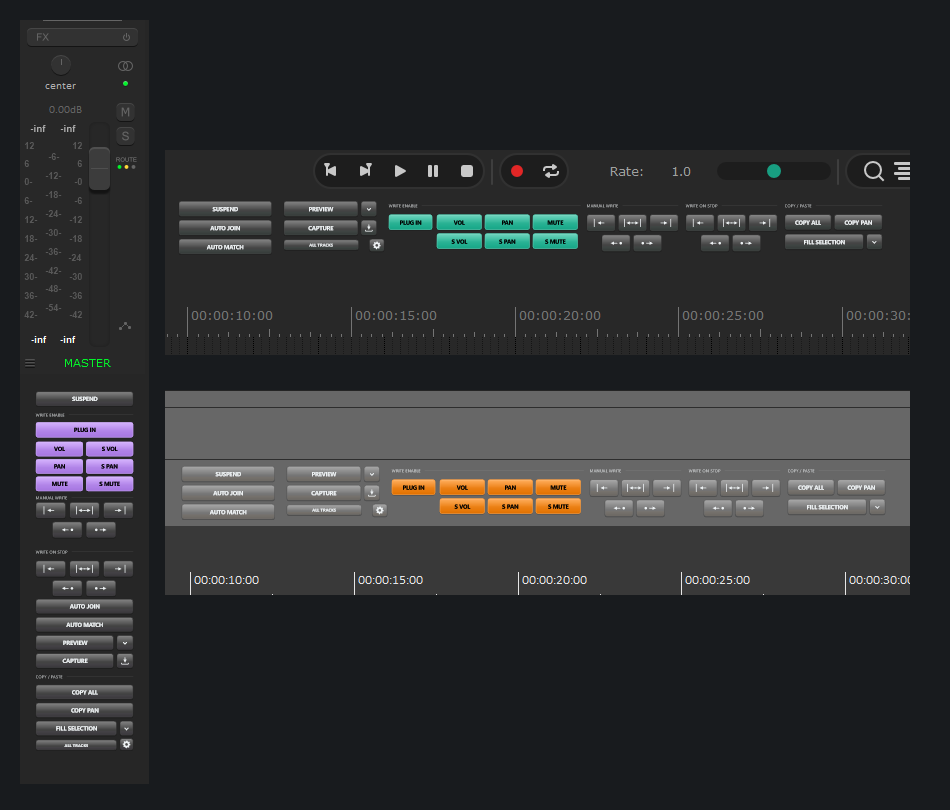
Actual REAPER captures: left docking beneath Master and shallow horizontal docking. Open the image for the full-size view.
Theme backgrounds and exposed accent colours carry into the panel. Choose Follow REAPER or five additional panel styles. Rounded buttons, vector icons and press feedback complete the interface.
Docking/undocking, Docker selection, themes, size, track scope, automation modes, startup settings, show/hide sections and the running version are available from the panel’s right-click menu.
Floating Auto adapts to the monitor. Docked Auto uses a compact 75% size. Explicit presets stay fixed as the Docker divider reveals more controls; overflow scrolls.
PUT IT UNDER YOUR FINGERS
Version 2.2.15 registers 104 individual actions plus the panel toggle in REAPER’s Main Actions list on Windows and Mac. Modifier-click functions also have separate actions.
Search EA: Automation, choose an action, then use Add in the shortcut area. The actions also work in toolbars and custom actions.
Full action referenceINSTALL / CHOOSE YOUR PLATFORM
Install v2.2.15 through ReaPack on Windows or Mac, or use the direct installers below. ReaPack installs the correct binary and matching Lua engine for your platform.
One universal binary, a standard Mac installer, manual-install files and complete source. No compiler, separate JUCE or Lua installation needed.
Download Mac preview.pkg installer.The installer uses your standard REAPER user resource folder and backs up previous EA extension/engine files. Custom or portable setups can use the included manual-install folder.
Mac preview status: compiled for both architectures; model checks ran on Intel and Apple Silicon, and installation/upgrade checks passed on a disposable Mac. Live REAPER Mac testing is still needed.
The extension is ad-hoc signed; the installer is not Apple notarized. macOS may require explicit Open Anyway approval.
Version 2.2.15 supports Windows 10/11 x64 and includes all 104 individual shortcut actions plus the panel toggle. Install through ReaPack below, or download the standalone installer.
Download Windows installerQuit REAPER, run EA-Native-Automation-Setup-v2.2.15.exe, follow the installer, then restart REAPER.
ReaPack instructions for Windows and MacLinux: source and build configurations only; no compiled Linux release. Complete corresponding source and dependency archives are included with the Mac preview.
After installation, run EA: Native Automation (JUCE) - toggle panel. Search EA: Automation to assign your own shortcuts.
Paste this URL into ReaPack: Import repositories.
Open repository indexIn REAPER, run ReaPack: Import repositories and paste the URL above.
Run ReaPack: Synchronize packages. In ReaPack: Browse packages, find EA Native Automation, select 2.2.15, choose Install/Update, then Apply.
Restart REAPER. In the Actions list, run EA: Native Automation (JUCE) - toggle panel.
ReaPack v2.2.15 supports Windows x64, Mac Intel x64 and Mac Apple Silicon arm64. Mac uses the same universal dylib and remains a preview awaiting live REAPER testing. Linux remains source only. No separate JUCE, ReaImGui or Lua installation is required to use the compiled packages.
Using the older standalone panel? Disable its startup option and close it before using this native extension. Enable Run at startup in the native panel menu if you want it to open with REAPER.
CURRENT TESTING STATUS
This is a tool still being tested in live REAPER sessions. Reproducible reports help identify where the host behaves differently.
Track volume and ordinary track pan Manual Write have reported cases of cursor dips/two points instead of the selected-range write, along with unexpected envelope-lane visibility. Recent hotfixes address these paths, but live confirmation remains pending.
If you encounter a problem, include the running version, affected parameter, Preview state, track scope and whether a time selection was present. The engine can write ManualWrite-diagnostics.txt beside engine.lua when verification fails.
Windows native checks and the 104-scenario Lua model suite (1,393 assertions) passed. The Mac universal build, Intel/Apple Silicon model checks and disposable-Mac install/upgrade checks passed. These checks do not verify live REAPER automation or Mac docking/scaling; live platform feedback is still needed. Linux compilation remains pending.
Validation details